
Скачать Sothink DHTML Menu – DHTML меню, инструмент веб-разработки, интеграция с HTML-редакторами, динамическая навигация, создатель меню
Обзор
Sothink DHTML Menu — специализированный программный инструмент, разработанный для веб‑разработчиков, желающих улучшить навигацию сайта с помощью динамических, интерактивных меню. Приложение позволяет пользователям создавать визуально привлекательные элементы навигации, используя Dynamic HTML (DHTML), сочетая функциональность с эстетической привлекательностью. Оно особенно подходит разработчикам, работающим над сложными веб‑сайтами, требующими структурированных многоуровневых систем навигации. Благодаря бесшовной интеграции с популярными HTML‑редакторами, такими как Dreamweaver и FrontPage, Sothink DHTML Menu упрощает рабочий процесс разработки, позволяя быстро внедрять меню без обширного кодирования.
Целевыми пользователями являются фронтенд‑разработчики, веб‑дизайнеры и цифровые агентства, участвующие в проектах по созданию веб‑сайтов. Инструмент идеален для создания интерактивных меню, которые улучшают пользовательский опыт за счёт плавных анимаций и адаптивного поведения. Реальные применения включают корпоративные сайты, платформы электронной коммерции и контент‑насыщенные порталы, где интуитивная навигация имеет решающее значение. Несмотря на выпуск в 2012 году, инструмент остаётся актуальным для разработчиков, которые ставят визуальное воздействие и структурированную навигацию в приоритет в наследуемых или стабильных веб‑окружениях.
Разработчик, Sothink, позиционирует этот инструмент как практичную утилиту в более широкой экосистеме веб‑разработки. Хотя дополнительной информации о компании нет, фокус программного обеспечения на интеграции и кастомизации отражает целенаправленный подход к решению распространённых дизайнерских задач. Его постоянное присутствие в наборах инструментов разработчиков подчёркивает надёжность для специфических сценариев, особенно в проектах, где предпочтительна интерактивность на основе DHTML вместо современных JavaScript‑фреймворков.
Ключевые функции и возможности
- User-Friendly Interface: Designed for intuitive operation, the tool allows users to generate complex menus with minimal effort. This accessibility benefits both novice developers and experienced professionals who value time efficiency.
- Customizable Animation Effects: Users can apply dynamic transitions such as fade-ins, slide effects, and movement animations to menu items, enhancing visual engagement without compromising usability.
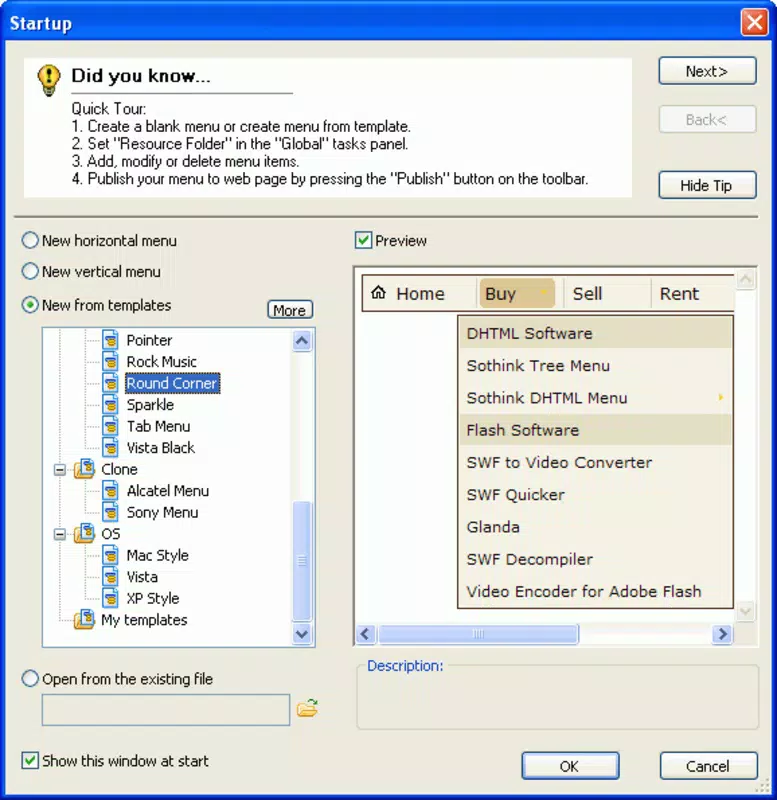
- Extensive Template Library: A built-in collection of pre-designed templates offers immediate starting points for various design styles, enabling rapid prototyping and consistent branding across web projects.
- Seamless HTML Editor Integration: Compatibility with Dreamweaver and FrontPage allows developers to embed custom menus directly into their projects, reducing the need for manual code insertion.
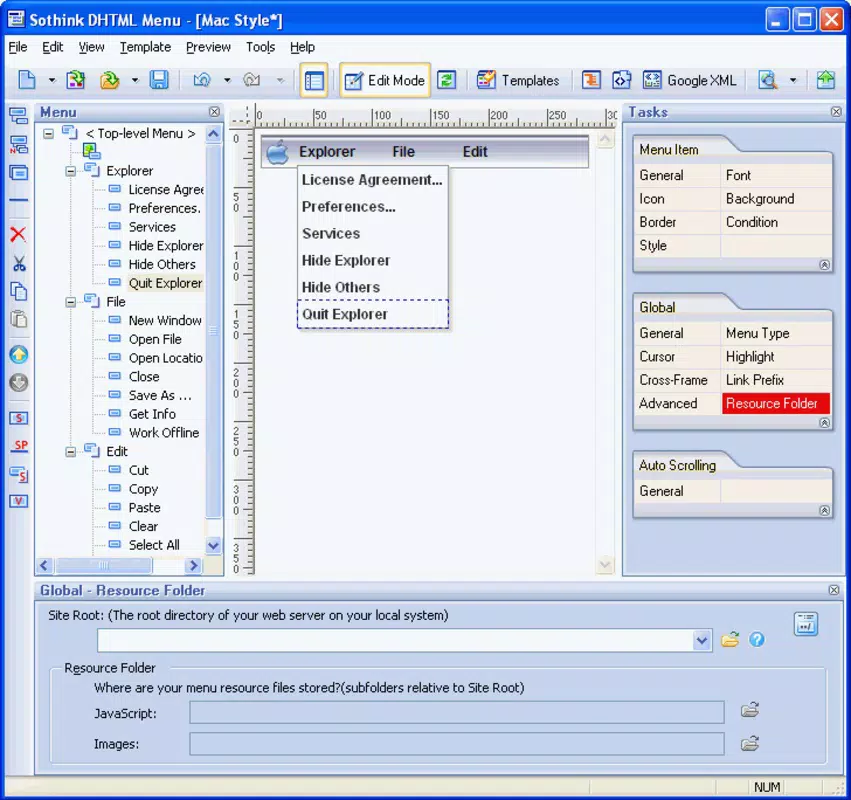
- Multi-Level Menu Support: The ability to create hierarchical navigation structures improves site organization and supports complex information architectures, ideal for large-scale websites.
For example, a developer building a documentation portal can use the template library to quickly generate a collapsible sidebar menu with animated transitions. This reduces development time while ensuring consistent user interaction across pages. Similarly, an e-commerce site can implement a multi-level navigation bar with hover effects, improving customer journey flow and product discoverability.
Интерфейс, UX и производительность
The user interface of Sothink DHTML Menu follows a traditional desktop software layout, with toolbars, preview panels, and configuration settings arranged for logical workflow. The visual design emphasizes functionality over aesthetics, focusing on clear labeling and accessible controls. Navigation is linear and predictable, allowing users to move through menu creation steps without confusion.
Although the developer did not list formal performance metrics, the application is designed to operate efficiently within standard Windows environments. It is expected to run smoothly on mid-range systems, with minimal lag during menu preview and export processes. Responsiveness is maintained during interactive tasks such as effect adjustments and template selection.
Stability appears to be a core focus, given the tool’s long-standing presence in the market. However, no information was provided regarding crash rates, memory usage, or update frequency. The application is not designed for mobile platforms, and its desktop-only nature suggests it is intended for use in development workflows rather than end-user interaction.
Совместимость платформ и технические требования
Sothink DHTML Menu is available exclusively for Windows, making it compatible with desktop systems running the Windows operating system. The software has a file size of 11.2 MB, indicating a lightweight installation that does not require significant disk space. The current version is listed as 1.0, suggesting a stable release with no major updates since its initial launch in 2012.
The developer did not specify minimum OS requirements, so users should ensure their system meets general Windows compatibility standards. No information was provided about support for newer Windows versions or potential limitations on modern hardware. Compatibility with current web standards, including HTML5 and responsive design principles, is not explicitly confirmed.
Плюсы и минусы
Плюсы
- Intuitive interface suitable for both beginners and experienced developers
- Rich library of customizable templates for faster design implementation
- Seamless integration with widely used HTML editors like Dreamweaver and FrontPage
- Support for multi-level, dynamic navigation menus with animation effects
- Lightweight installation with a small file size of 11.2 MB
Минусы
- Released in 2012; no recent updates or modernization efforts noted
- Platform limited to Windows; no support for macOS or Linux
- Specific system requirements and compatibility details were not disclosed
- Not optimized for responsive or mobile-first web design approaches
- Limited information on ongoing support or developer updates
Часто задаваемые вопросы
Совместим ли Sothink DHTML Menu с современными веб-браузерами?
The application is designed to generate DHTML code intended for web use. However, specific compatibility with current browser versions is not detailed by the developer.
Можно ли использовать Sothink DHTML Menu на macOS или Linux?
Currently, the software is only available for Windows. No versions for macOS or Linux have been released.
Поддерживает ли инструмент HTML5 и адаптивный дизайн?
While the tool generates DHTML-based menus, explicit support for HTML5 or responsive design features is not confirmed in the provided documentation.
Как часто обновляется Sothink DHTML Menu?
The latest version is 1.0, released in 2012. No information about future updates or maintenance cycles is available.
Безопасно ли скачивать и устанавливать это программное обеспечение?
As a desktop development tool, Sothink DHTML Menu does not collect user data. However, users should ensure they download from official sources to avoid potential security risks.
Заключительные мысли
Sothink DHTML Menu remains a functional tool for developers who rely on DHTML-based navigation and require integration with legacy HTML editors. Its customizable templates, animation effects, and multi-level menu support offer tangible benefits for specific web projects. While its age and lack of modern updates are notable limitations, the tool continues to serve niche use cases where simplicity, compatibility, and visual polish are prioritized.
For developers working within constrained environments or maintaining older websites, this software provides a reliable solution. However, those seeking modern, responsive, or mobile-optimized navigation should consider alternative frameworks. The combination of a lightweight footprint and strong editor integration makes it a practical choice for targeted workflows.
Скачать Sothink DHTML Menu сейчас


